Reverse-Engineering a ‘Glowing Hands’ Interaction with AI
Reconstructing an interactive design from visual output and extending it through prompt iteration.
Project Snapshot
Type: AI Interaction Experiment
Focus: Prompt engineering, interaction design
Tools: ChatGPT, Lovable, Base44
Key Contribution: Reverse-engineered prompt from visual output and extended interaction with customizable variations
Outcome: Interactive prototype with multiple display modes
Background
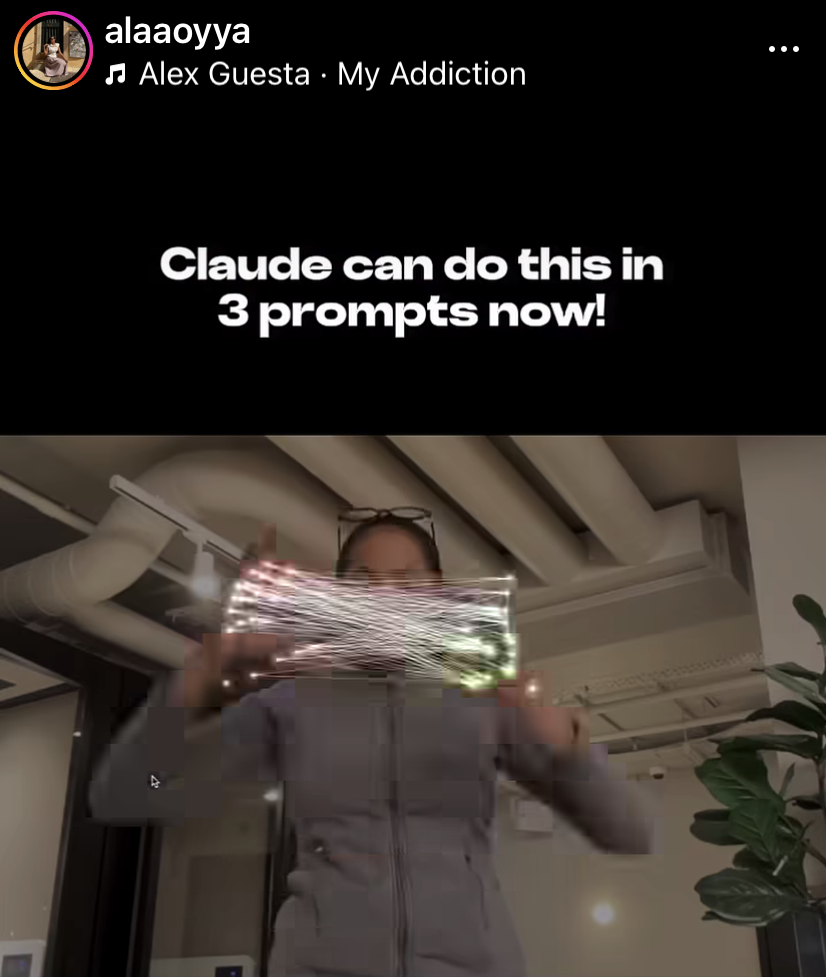
This experiment was inspired by a post I came across on Instagram by Alaa, who shared an interactive design along with the prompt behind it. I was intrigued by the result and wanted to recreate the experience myself.
Challenge
However, even with the original prompt from Alaa, I wasn’t able to reproduce the same outcome. This highlighted a common challenge with AI-generated work: prompts are often highly sensitive to nuance and context.
Process
To build the interactive tool and experiment the AI tools, I described the expected behaviours and visual elements on ChatGPT, together with a screenshot of the original instagram-post from Alaa, and ask ChatGPT to write a more accurate prompt for me.
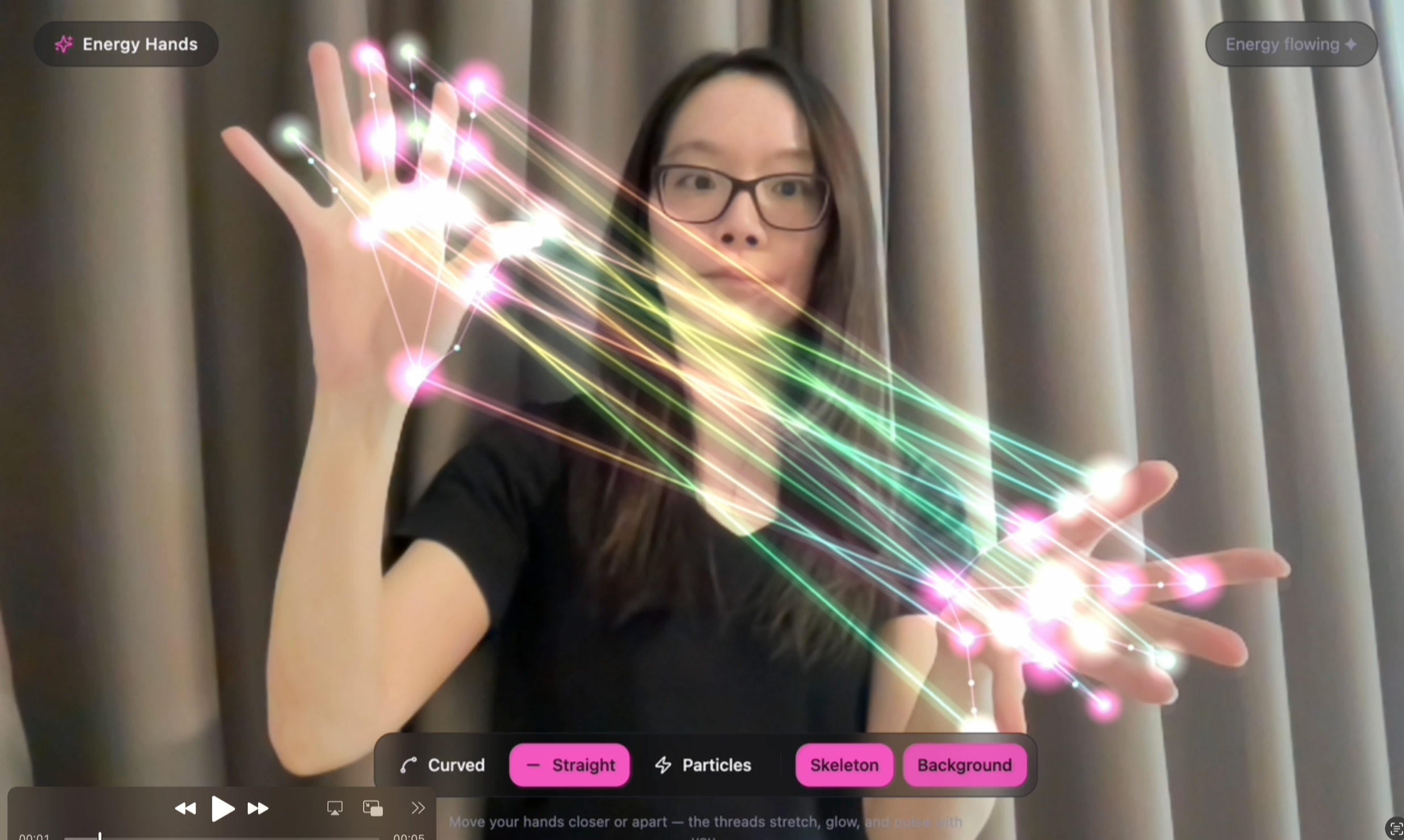
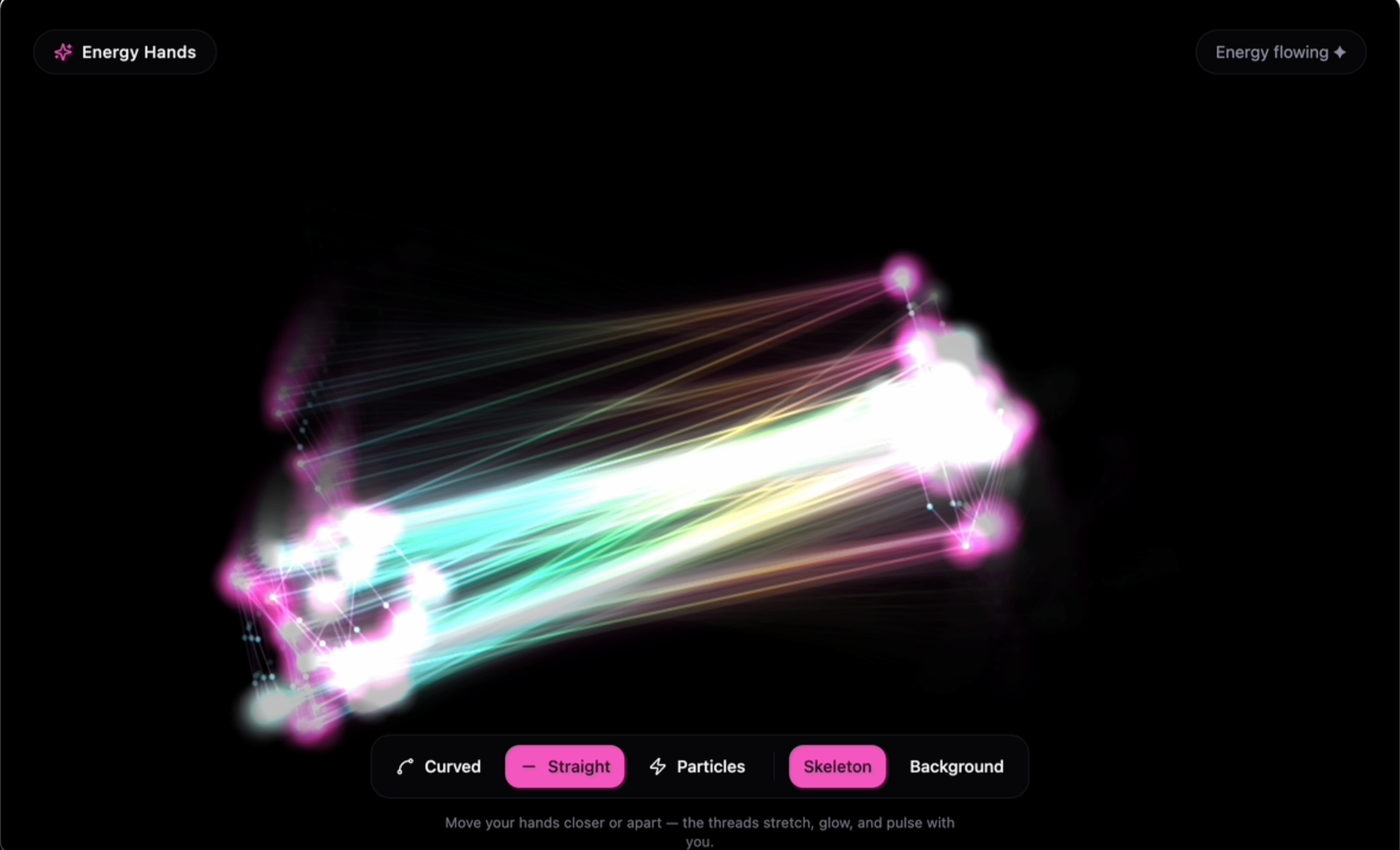
I then brought this refined prompt into Lovable, where I iterated further. Beyond replication, I explored variations: such as adapting the design for a dark background and removing human figures, to test how flexible the interaction could be. These variations were implemented as optional settings for users.
Result
The final result is an interactive prototype that not only recreates the original concept more closely but also extends it with additional customization options.
Explore the interactive version here: Lovable Prototype
Prompt & Iterations
-
🎯 Prompt: AI Interactive Tool (Hand Tracking + Light Strings)
Create a web-based interactive prototype that uses the user’s webcam to detect both hands in real time and render glowing, animated lines between key points on the hands, inspired by the attached reference image.🧠 Core Concept
The experience should simulate “energy strings” or “light threads” flowing between the user’s two hands. When the user moves their hands, the lines dynamically follow and stretch, creating a fluid, magical visual effect.
⚙️ Technical Requirements
Use JavaScript (frontend only)
Use MediaPipe Hands OR TensorFlow.js Handpose for real-time hand tracking
Use HTML5 Canvas or WebGL (Three.js optional) for rendering visuals
Must run in the browser (no backend required)
✋ Hand Detection
Detect both hands simultaneously
Track key landmarks (e.g. fingertips, palm center)
At minimum, use:
Fingertips (index, middle, ring, pinky, thumb)
Wrist or palm base
✨ Visual Effects
Draw multiple glowing lines connecting points between the two hands:
e.g. fingertip → fingertip
or create a “curtain” of lines between palms
Lines should:
Be semi-transparent
Have a glowing/neon effect
Use gradients (e.g. pink → yellow → green like the reference)
Slightly animate (flicker, pulse, or flow)
🌈 Interaction Behavior
Lines appear only when both hands are visible
The distance between hands affects:
Line length
Brightness or intensity
Optional enhancements:
Add particle effects along the lines
Add trailing motion (like light streaks)
Add subtle physics (elastic/stretch feel)
🎨 Design Details
Dark or neutral background for contrast
Smooth animation (use requestAnimationFrame)
Visual style should feel:
Soft
Magical
Responsive
Slightly organic (not rigid straight lines)
📦 Output
Full working code (HTML + CSS + JS)Clear setup instructions
Comments explaining key parts:
Hand tracking logic
Rendering logic
Keep dependencies minimal and easy to run locally
⭐ Bonus (if possible)
Add a UI toggle:
Switch between different line styles (straight / curved / particle)
Add mobile support (if feasible)
Use the attached image as inspiration for the visual style and interaction feel.
-
Make the background optional- add a switcher that allow users to turn on or off the background, turn it on means, the camera will see the players/users, turn it off would be like current state, only detect user's hands, with no people, no face, only darkness
-
🪄 Prompt: "Energy Hands" — Webcam Light-Thread Visualizer
Build a web-based interactive prototype that uses the user's webcam to detect both hands in real time and render glowing, animated "energy strings" flowing between them. The vibe should feel soft, magical, responsive, and slightly organic — like channeling light between your palms.
🧠 Core Concept
When the user holds up both hands to the camera, glowing multicolored threads stretch between matching points on the two hands (fingertips, finger bases, palm joints). The threads:
Sag and wobble organically (not rigid straight lines)
Pulse and flicker with a subtle animated shimmer
Grow brighter and more intense as the hands move closer together
Emit soft radial sparks at every endpoint
⚙️ Technical Stack
Framework: React + Vite + TypeScript
Styling: Tailwind CSS with HSL semantic design tokens
Hand tracking: MediaPipe Hands — loaded via CDN <script> tags in index.html, NOT via npm (npm bundling breaks the Hands constructor in production builds)
Rendering: HTML5 <canvas> 2D context with globalCompositeOperation = "lighter" for additive glow
CDN scripts to include in index.html:
<script src="https://cdn.jsdelivr.net/npm/@mediapipe/camera_utils@0.3.1675466862/camera_utils.js"></script> <script src="https://cdn.jsdelivr.net/npm/@mediapipe/hands@0.4.1646424915/hands.js"></script>
🎨 Visual Design
Background: Deep near-black (hsl(240 15% 4%))
Energy palette (gradient stops along each thread):
Pink hsl(320 100% 65%) → Yellow hsl(50 100% 60%) → Green hsl(150 100% 55%) → Cyan hsl(190 100% 60%)
Layered glow: each thread is drawn twice — a wide blurred outer pass (shadowBlur: 30, lineWidth: 14) plus a bright thin inner core (shadowBlur: 12, lineWidth: 2.2) with a sine-wave flicker
Motion trails: instead of clearing the canvas each frame, fill it with a low-alpha black (hsla(0,0%,0%,0.25)) so previous frames fade gradually
Endpoint sparks: radial gradient (yellow core → pink falloff → transparent) at each landmark
No people, no faces — only the glowing threads and (optionally) the webcam feed
🔗 Hand Connections
Connect ~15 matching MediaPipe Hands landmarks across the two hands (denser than fingertips alone, but not the full skeleton). Use these indices on both hands:
[0, 4, 8, 12, 16, 20, // wrist + 5 fingertips 2, 5, 9, 13, 17, // thumb CMC + 4 finger MCPs (bases) 3, 6, 10, 14] // thumb IP + 3 finger PIPs (mid joints)
Each pair of corresponding points gets one curved energy thread.
🧮 Thread Geometry
Use a quadratic Bézier curve between each pair of points
Add a sag proportional to thread length (capped ~120px), reduced when hands are close
Add an organic wobble via Math.sin(time * 2 + x * 0.01) * 12 on the control point
Compute closeness = 1 - clamp(palmDistance / (0.6 * diagonal), 0, 1) and use it to drive overall intensity
🎛️ UI Controls (floating glassmorphic pill, bottom-center)
Line style toggle: Curved / Straight / Particle (particle mode spawns glowing dots traveling along the bezier)
Skeleton toggle: show/hide the MediaPipe hand skeleton dots in muted purple
Background toggle:
Off (default): pure dark — only hands' threads visible, no person/face shown
On: mirrored webcam feed drawn behind the threads with cover scaling and globalAlpha: 0.85
Status pill (top-right): "Loading…" / "Show both hands" / "Energy flowing ✦" / error states
📷 Camera Setup
Mirror the video horizontally (selfie view): (1 - landmark.x) * width
Request 1280×720 at start, fit canvas to full viewport (window.innerWidth/Height), re-fit on resize
MediaPipe Hands options: maxNumHands: 2, modelComplexity: 1, minDetectionConfidence: 0.6, minTrackingConfidence: 0.6
📦 Deliverables
Full working React + TypeScript code
Comments on the three key systems: hand tracking init, per-frame render loop, thread geometry & glow layering
Mobile-friendly (responsive canvas, works in mobile Safari/Chrome with camera permission)
Minimal dependencies — MediaPipe via CDN, everything else from the standard React/Vite/Tailwind stack